
PersonalClaw
One agentic OS.
Your machine.
Your rules.
Chat, autonomous goals, memory, knowledge, and automation behind one gateway you own.
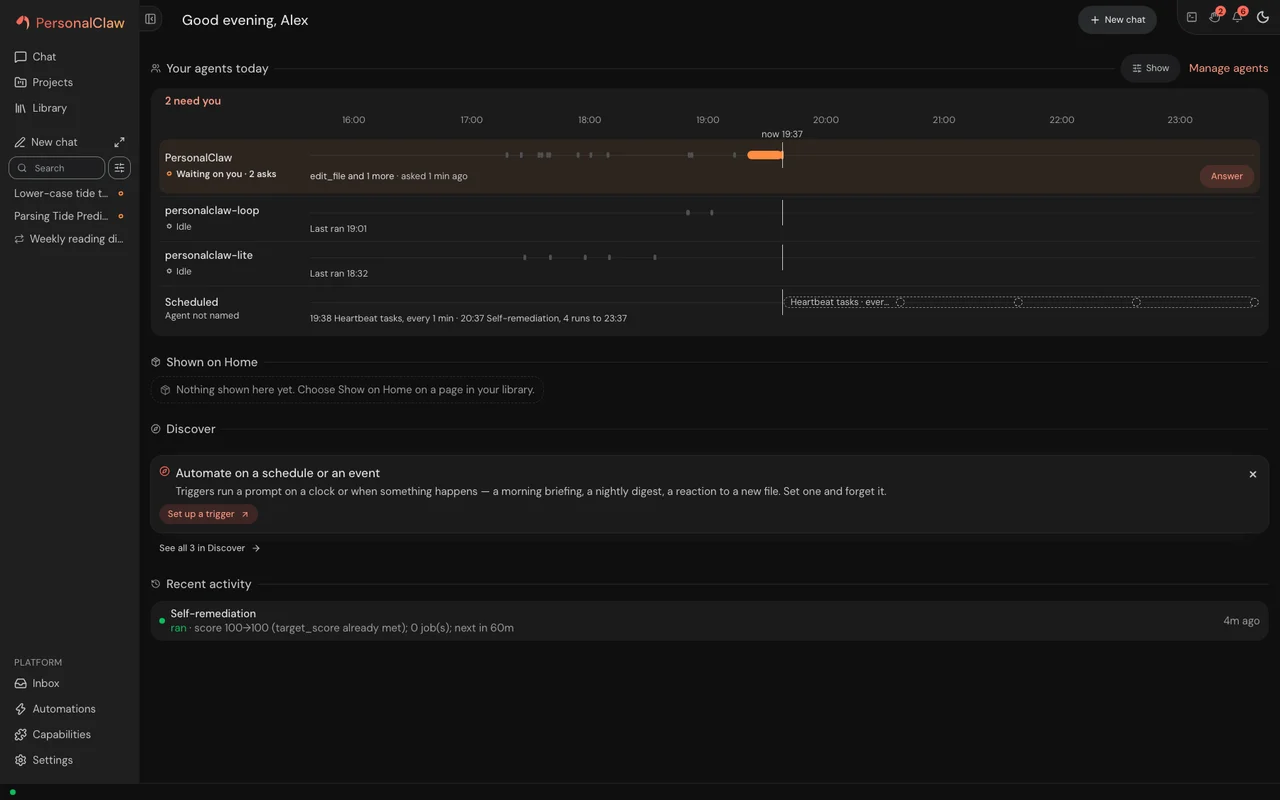
See what waits on you
Approvals, ready tasks, current work, and recent conversations stay visible from one home.Install PersonalClaw
Download the installer
This saves a file named
installin the current folder. It runs nothing.curl -fsSLO https://personalclaw.dev/installCheck it before it runs
- SHA-256
5ba175ca9ab6f06502fc76ef75672e739ea5130ec72962977677722826e1e384Core records the same digest in install.sh.sha256 at v0.3.9.- Signature
- Not signed yet. Until core's releases sign it, the checksum is the check.
- Platforms
- macOS and Linux. On Windows, use Docker Compose from the install guide.
- Python
- 3.13, which the installer fetches through
uvif your machine has none.
echo "5ba175ca9ab6f06502fc76ef75672e739ea5130ec72962977677722826e1e384 install" | shasum -a 256 -cIt prints
install: OK. On Linux,sha256sum -ctakes the same line. If it printsFAILED, delete the file and don't run it.Read the script
#!/bin/sh
# PersonalClaw bootstrap installer — the `curl -fsSL https://personalclaw.dev/install | sh` one-liner.
#
# THIS FILE IS THE SOURCE OF TRUTH for the bytes served at https://personalclaw.dev/install.
# It is staged here — rather than living only in the website repo (personalclaw.dev) —
# because the rail below is here.
# The website repo's public/install is a MIRROR: re-apply it whenever this file changes,
# and update install.sh.sha256 in the same commit (deploy/website/README.md §1).
#
# What CI actually does with this file. Every claim in this block is asserted by
# tests/test_website_installer.py, which reds if the job it names stops existing or
# stops naming this file — an earlier version of this header advertised a weekly
# container smoke that had never been written, and nothing noticed:
#   · pr.yml   `test`          the catalogue's static entry, on every PR: shellcheck -s sh +
#                              sh -n + dash -n on this file, then the offline contract:
#                              --help / --container / unknown-arg, the truncation-safe
#                              structure, staged-vs-pinned digest
#   · breadth.yml `install-smoke` runs BOTH this file AND the bytes actually served at
#                              /install, in a bare ubuntu container (nightly),
#                              and reds when the two disagree. A fetch that
#                              fails reports `unproven` and reds; it never goes green.
#
# What it does (idempotent — re-running upgrades):
#   1. `--container` → print the Docker Compose snippet and exit (no install).
#   2. Ensure `uv` is present (installs via the official installer if missing).
#   3. `uv tool install --upgrade --python $PC_PYTHON personalclaw>=$PC_MIN_VERSION` (uv
#      downloads that Python when the machine has none). The floor bounds a downgrade attack
#      without giving up --upgrade — see PC_MIN_VERSION below for why it lags the current
#      release by one, and PC_PYTHON for why the Python is named.
#   4. Print next steps and offer to run `personalclaw setup`.
#
# POSIX sh only (no bashisms) so it runs under dash/ash/sh on Linux + macOS.

set -eu

PC_PACKAGE="personalclaw"
# Downgrade floor for the PyPI install below, and it is deliberately the PREVIOUS release
# rather than the version this tree builds.
#
# WHAT IT BUYS. `--upgrade` already resolves to the newest release, so on an honest index the
# floor forbids nothing (measured 2026-09-07, uv 0.12.5: `>=0.1.2` + `--upgrade` installs
# 0.1.3). Its whole job is the dishonest case: a rolled-back or yanked-and-replaced index
# that offers only old code. Unfloored, that installs silently — measured `+ personalclaw==
# 0.1.0`, exit 0. Floored, uv exits 1 with "unsatisfiable". Loud beats quiet.
#
# WHY NOT THE CURRENT VERSION. A floor equal to pyproject's version is unsatisfiable for as
# long as it takes that release to reach PyPI and its mirrors — measured, `>=0.1.4` exits 1
# today with "only personalclaw<=0.1.3 is available". That window would break every install
# AND breadth.yml's `install-smoke`, which runs this file for real every night. One
# release behind has always shipped already, so the floor can never demand a version that
# does not exist yet. The cost is one unguarded step: a rollback to the immediately-previous
# release still installs, which is the attacker's weakest move anyway.
#
# WHY IT CANNOT ROT. A hand-typed version in a shell script is the defect in #2554 (two
# copies drifted three weeks). tests/test_website_installer.py pins this constant to
# CHANGELOG.md's second-newest release heading, so it reds the release after it goes stale.
PC_MIN_VERSION="0.3.8"
# The Python the tool environment is built on, named because uv will not choose a supported one
# by itself: it ignores the upper bound of a package's Requires-Python, so an install that names
# none lands on the newest interpreter uv finds or downloads (measured, uv 0.12.19: a wheel
# declaring <3.14,>=3.12 installed on CPython 3.14.7, exit 0, no warning). Re-running this file
# moves an environment built on another Python onto this one. The rails that keep it inside
# pyproject's requires-python and the Pythons CI tests, and every documented install command
# on the same version, are in tests/test_every_install_names_a_supported_python.py.
PC_PYTHON="3.13"
UV_INSTALLER_URL="https://astral.sh/uv/install.sh"

# ── tiny output helpers ──────────────────────────────────────────────────────
if [ -t 1 ]; then
    _bold=$(printf '\033[1m')
    _dim=$(printf '\033[2m')
    _reset=$(printf '\033[0m')
else
    _bold=''
    _dim=''
    _reset=''
fi
say() { printf '%s\n' "$*"; }
step() { printf '%s==>%s %s\n' "$_bold" "$_reset" "$*"; }
warn() { printf '%swarning:%s %s\n' "$_bold" "$_reset" "$*" >&2; }
die() {
    printf 'error: %s\n' "$*" >&2
    exit 1
}
have() { command -v "$1" >/dev/null 2>&1; }

# ── --container: print the compose snippet and exit ──────────────────────────
print_container() {
    cat <<'EOF'
Run PersonalClaw in one container (nothing to check out, no .env) — from an empty
directory on a machine with only Docker:

  docker run -d --name personalclaw --restart unless-stopped -p 127.0.0.1:10000:10000 -e PERSONALCLAW_BIND_HOST=0.0.0.0 -v personalclaw_home:/data ghcr.io/personalclaw/personalclaw-gateway:latest
  docker exec personalclaw personalclaw token   # prints the dashboard URL + token

Or with Docker Compose, which adds a TLS proxy (self-hosters / Windows):

  cp .env.example .env        # optional: set provider keys / options
  docker compose -f deploy/compose/compose.yaml up -d

The dashboard comes up on http://127.0.0.1:10000 with a persistent volume.
Details, backups, and updates: https://github.com/PersonalClaw/PersonalClaw/blob/main/docs/guides/containers.md
EOF
}

# ── OS / arch detection (informational + guard rails) ────────────────────────
detect_platform() {
    os=$(uname -s 2>/dev/null || echo unknown)
    arch=$(uname -m 2>/dev/null || echo unknown)
    case "$os" in
        Linux | Darwin) : ;;
        *)
            warn "unsupported OS '$os' — the uv path targets Linux and macOS."
            warn "On Windows, use the Docker Compose path:  sh install.sh --container"
            ;;
    esac
    say "${_dim}Detected platform: $os $arch${_reset}"
}

# ── ensure uv is installed ───────────────────────────────────────────────────
ensure_uv() {
    if have uv; then
        say "${_dim}uv already installed: $(uv --version 2>/dev/null || echo present)${_reset}"
        return 0
    fi
    step "Installing uv (Astral's Python package/tool manager)…"
    # The trust chain for THIS fetch is TLS to astral.sh plus Astral's release hygiene, and
    # nothing else. We do not verify these bytes: no digest, no version pin, and astral.sh
    # redirects — so a compromised host, a mis-issued certificate or a hostile redirect
    # would execute here. uv's installer does checksum-pin the uv BINARIES it goes on to
    # fetch, but that is a different download and says nothing about the script we pipe into
    # sh. (An earlier version of this comment claimed otherwise — see #2582.) This is the
    # same posture as rustup, nvm and uv's own documented bootstrap: chosen, not overlooked.
    # A user who wants a verified fetch can check THIS file's digest against the copy committed
    # in the GitHub repo first; that path covers our bytes, not Astral's, and is written up
    # under "Verify the one-liner" in docs/guides/getting-started.md §1.
    # Prefer curl, fall back to wget.
    if have curl; then
        curl -fsSL "$UV_INSTALLER_URL" | sh
    elif have wget; then
        wget -qO- "$UV_INSTALLER_URL" | sh
    else
        die "need curl or wget to install uv. Install one, or install uv manually: https://docs.astral.sh/uv/"
    fi
    # The installer drops uv in ~/.local/bin (or $XDG_BIN_HOME / ~/.cargo/bin);
    # make it visible to THIS shell so the tool-install below finds it.
    for d in "$HOME/.local/bin" "$HOME/.cargo/bin" "${XDG_BIN_HOME:-}"; do
        [ -n "$d" ] && [ -d "$d" ] && case ":$PATH:" in
            *":$d:"*) : ;;
            *) PATH="$d:$PATH" ;;
        esac
    done
    export PATH
    have uv || die "uv was installed but is not on PATH. Open a new shell and re-run, or add ~/.local/bin to PATH."
}

# ── install / upgrade personalclaw ───────────────────────────────────────────
install_personalclaw() {
    step "Installing $PC_PACKAGE with uv on Python $PC_PYTHON (uv downloads it if this machine has none)…"
    # --upgrade makes re-runs idempotent: a fresh install the first time, an
    # in-place upgrade to the latest release afterwards. The >= floor does not narrow that —
    # --upgrade still resolves to the newest release; it only refuses an index that offers
    # nothing at or above PC_MIN_VERSION. See PC_MIN_VERSION at the top of this file, and
    # PC_PYTHON beside it for the --python.
    uv tool install --upgrade --python "$PC_PYTHON" "$PC_PACKAGE>=$PC_MIN_VERSION"
    have personalclaw || {
        warn "personalclaw installed but not yet on PATH."
        warn "Run 'uv tool update-shell' (or open a new shell), then 'personalclaw setup'."
        return 0
    }
}

# ── offer to run setup ───────────────────────────────────────────────────────
offer_setup() {
    have personalclaw || return 0
    say ""
    step "Installed. Next steps:"
    say "  personalclaw setup      # configure your workspace directory + timezone"
    say "  personalclaw gateway    # start the dashboard on http://localhost:10000"
    say ""
    # Only prompt when we have a real TTY (piped `curl | sh` has none — don't hang).
    if [ -t 0 ]; then
        # The backticks below are prose the USER reads — they quote the command name in the
        # prompt. Single quotes are deliberate: no expansion is wanted, and double quotes
        # would turn `personalclaw setup` into a real command substitution. SC2016 flags the
        # shape without knowing that, so it is silenced on the next line only.
        # NOTE: a shellcheck directive must be a line of its own — trailing prose after the
        # key=value is parsed as another pair and errors with SC1125.
        # shellcheck disable=SC2016
        printf 'Run `personalclaw setup` now? [y/N] '
        read -r reply || reply=n
        case "$reply" in
            [Yy] | [Yy][Ee][Ss]) exec personalclaw setup ;;
            *) say "Skipped. Run 'personalclaw setup' when you're ready." ;;
        esac
    else
        say "${_dim}(non-interactive install — run 'personalclaw setup' yourself.)${_reset}"
    fi
}

main() {
    for arg in "$@"; do
        case "$arg" in
            --container)
                print_container
                exit 0
                ;;
            -h | --help)
                say "Usage: install.sh [--container]"
                say "  (no args)    install personalclaw via uv"
                say "  --container  print the Docker Compose snippet instead"
                exit 0
                ;;
            *) die "unknown argument: $arg (try --help)" ;;
        esac
    done

    say "${_bold}PersonalClaw installer${_reset}"
    detect_platform
    ensure_uv
    install_personalclaw
    offer_setup
}

main "$@"
Run it
sh installIt installs PersonalClaw and offers to run setup. The dashboard opens at
localhost:10000once the gateway starts. uv, pipx, pip and Docker Compose are in the install guide.PersonalClaw is pre-1.0, and an update can change how your data is stored. Run
personalclaw snapshotbefore each one. What that means
Desktop app Experimental
Built by core's CI and attached to the v0.3.9 release. There is no in-app update: a new version is a download you install over the old one.
On Compare: what it iswhy it is experimental
Ad-hoc signed, not notarized: macOS asks you to approve it once. How to approve it
- SHA-256
ec51751e1175ef66f7d0eb1becfbbe20378f5b74792014b4672e22b2ab906ca6
echo "ec51751e1175ef66f7d0eb1becfbbe20378f5b74792014b4672e22b2ab906ca6 PersonalClaw-0.3.9-arm64.dmg" | shasum -a 256 -cRun it where the file is. It prints PersonalClaw-0.3.9-arm64.dmg: OK.
The Intel dmg's checksum
38a9a95855cf3b0fec019669dbb502737feab73569c9b350c827ac4cbac54606 echo "38a9a95855cf3b0fec019669dbb502737feab73569c9b350c827ac4cbac54606 PersonalClaw-0.3.9-x64.dmg" | shasum -a 256 -cLinux, x86-64
Unsigned. Installing them
Their checksums
6ef5bdaf93aca48231cc434773da63fe7d2e8bd5599d804a063f3136a383eca5 echo "6ef5bdaf93aca48231cc434773da63fe7d2e8bd5599d804a063f3136a383eca5 PersonalClaw-0.3.9.AppImage" | shasum -a 256 -c3b039763a044b648fad6564b09ac7d0a261eeac098c9681b95149ea992ad178d echo "3b039763a044b648fad6564b09ac7d0a261eeac098c9681b95149ea992ad178d personalclaw-desktop_0.3.9_amd64.deb" | shasum -a 256 -cOn Linux, sha256sum -c takes the same line.
Check it before you trust it.
Each claim names its evidence and the release it was last checked against.
The release attaches SBOMs for the wheel and both container images.
EvidenceRelease assets: The v0.3.9 release
Last verifiedv0.3.9
A threat model maps each control to the OWASP Agentic Top 10.
EvidenceThreat model: The OWASP mapping
Last verifiedv0.3.9
Zero telemetry. Narrower than it sounds.
EvidenceComparison row: The telemetry row
Last verifiedv0.3.9
The code is under a permissive open-source license. Holds.
EvidenceLicense file: LICENSE
Last verifiedv0.3.9
Hand off the work. Keep the controls.
Delegate a goal, not a prompt.
A goal loop plans, works cycle by cycle under a deterministic supervisor, and reports against the goal. It runs without constant prompting, and never behind a spinner.
- Pause, nudge, or stop a loop
- Inspect every cycle and result

Approve from the keyboard.
When an agent wants a tool that needs your say, the request waits in the chat and in your inbox. Cmd Enter (Ctrl Enter off a Mac) approves the request that has keyboard focus. A delete, a change outside the chat's folder, a send to other people, spending, or a tool that doesn't say what it does asks once more first.
Every key, in the keyboard guide
Your state stays home.
Everything PersonalClaw keeps lives in one folder on your machine. A model, a search engine or a channel is reached through something you add.
On your machine: ~/.personalclaw
- Memorymemory.db, learning.db, lessons.jsonl
- Knowledgeknowledge.db, sources, research_reports.json
- Worksessions, projects, loop/loops.db, artifacts
- Automationtriggers.json, crons.json, workflows
- Platformapps, agents, skills, inbox
- Configconfig.json, active_models.json, mcp.json
- Securitycredentials, grants, security_events.jsonl
Across the network, when you add it
- A model provider app you bind
- A search provider app you bind
- A channel app you connect
- An MCP server you add
The one call it makes on its own, the update check, is on /compare, with how to turn it off.
Every vendor is an app.
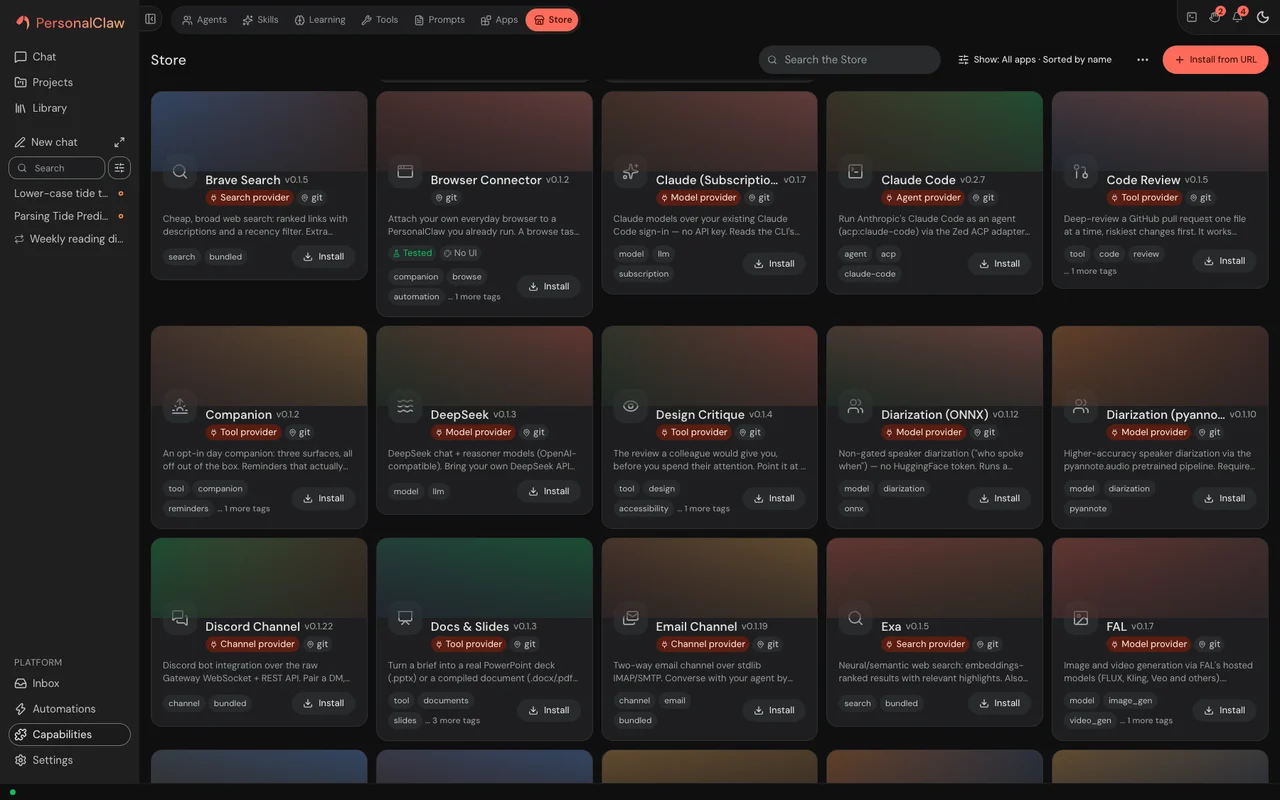
Models, search, speech, channels, tools and agent runtimes are apps you install and uninstall, each one a bundle with its own permissions. 69 first-party apps ship at this release.
- Models 18
- Search 7
- Agents 4
- Tools 11
- Speech 5
- Channels 5
- Inboxes 2
- Knowledge 3
- Automation 4
- Sync 4
- Sandboxes 1
- Skills 1
- Products 2
- Companions 2
Build on it.
An app is a folder with an app.json. When someone installs it, it lands in quarantine, a scan gives it a verdict, and it waits for their consent before it runs.
{
  "name": "web-tools",
  "version": "0.1.6",
  "displayName": "Web Tools",
  "description": "General web primitives the agent can call: web_search, web_fetch, and web_extract. web_search runs over the search provider you bind in Settings \u2192 Search, web_fetch is an SSRF-guarded page fetch + extraction, and web_extract does structured extraction. No key of its own \u2014 it uses the bound search provider's.",
  "icon": "Globe",
  "author": "PersonalClaw",
  "license": "MIT",
  "minPersonalClawVersion": "0.2.3",
  "tags": [
    "tool",
    "web"
  ],
  "prompts": [
    "prompts/web-extract.yaml"
  ],
  "permissions": {
    "network": true
  },
  "provider": {
    "id": "tools",
    "label": "Search, fetch and extract web pages",
    "type": "tool",
    "implementation": "provider:create_provider",
    "capabilities": [
      "web"
    ]
  }
}
The model proposes; deterministic controls outside it decide what reaches your shell, your network and your apps. An app gets a scoped gateway token, and its own code still runs as you. How the boundary holds
Early, and honest about it.
PersonalClaw is pre-1.0: a release can change how your data is stored, with no automatic migration. Run personalclaw snapshot before you update, and personalclaw restore brings it back. What holds and what doesn't, row by row
The latest releases
A command prints only what it makes now, and a check exits 1 when it finds what it checks for, so read getting-started's Updating before you update a script that reads one. Five parts of the app are redesigned. Needs you is one list of what waits on your answer: each card leads with what it asks and answers it there, and its panel shows the proposal itself. Library is one page of everything you keep, with a preview beside it. The Projects page says what needs you and what is running in each project, and a project's page opens on a box to start a chat there. A plan step is approved only as you read it, and a change to it after you read it is put to you again. The agent orb shows each state in a form of its own, from a still ring when it is ready to the claw mark when a turn is done.
A workflow reads its secrets from Settings → Secrets alone now, so save any secret that only the gateway's starting environment held in Settings → Secrets before you update, then take it out of that environment. Chat preferences, the gear on the chat box, holds a chat's explanations, reply style and Optimize; how replies explain things is a setting in Agent defaults that reaches every chat, asked once in a small window; and the sidebar's chat history is one list, with a search and a Sort and filter menu. Home's Overview shows your agents and what they did today, and tasks, Home and notifications render what agents wrote. The desktop app updates an older gateway it found and uses one only at its own version or newer, its sidebar paints the web UI's colours, and a theme switch reaches the whole window at once. Hands-free voice explains itself, sends only when a confirmation phrase ends what you said, and keeps what you typed. Stopping a workflow run ends the agents and runs its steps started, and skipping a step inside a loop skips it in every cycle. The web image runs nginx 1.31.8, and the gateway image's agent CLIs run on Node 24.22.2.
A browser's sign-in needs more than its cookie now, so every browser and paired device signs in once after this update, and the desktop app needs 0.3.7 or newer to open this gateway. A widget's action waits for you to send it, a project's secret file opens only for a chat you allow, computer use refuses a click that moves the real pointer until it can be held to the app it names, and an image from another site loads only when you press Load. The desktop app starts its own gateway when it opens, can use the one already serving its home, and updates itself when you press for it, and a gateway refuses a home a newer PersonalClaw has used. Home's Overview shows your agents' day, its Desktop and Browse live views show only while an agent drives this computer or a browse runs, and a page's controls sit in its header, in one order. Stop stops only the turn you pressed it for, renaming or pinning a chat no longer rewrites its transcript, a gateway on Linux no longer stops answering when the loop list and a background read meet, an MCP server's paged tool list is read to its end, and quiet hours keep the configured timezone.
Questions
Does it phone home?
No analytics, no crash reporting and no usage reporting of any kind - nothing about how you use it is sent anywhere. But the claim as stated is wider than the truth: by default PersonalClaw asks GitHub whether a newer release exists when it starts and then every twelve hours, identifying itself with a `personalclaw-update-check` user agent, and the desktop app asks too, a minute after it starts, at once when it finds a newer gateway running, and then once a day, with the same user agent. You did not ask it to. Since v0.2.0 a setting turns those automatic checks off (the row below), but they are on out of the box. If you grep the tree you will also find a `telemetry_salt` and a hashed owner id; at this release both stay on this machine - the salt is kept out of packs, exports and sync, the hash is shown only by the gateway's own status endpoint - and nothing transmits either.
`updates.check_enabled` (Automatic Update Checks, in Settings under Updates) turns it off. Every check PersonalClaw makes on its own - at start, on the interval, when a page showing update status finds one due, and before a staged install - asks that setting first, read fresh each time, so switching it off stops the next check without a restart, and the desktop app's own checks read the same setting. With it off, PersonalClaw reaches GitHub for updates only when you ask: Check now, an Update you press, the desktop app's Check for Updates, or `personalclaw update`. It is on by default.
What runs locally?
The gateway, the dashboard and everything under ~/.personalclaw. A local-model contract ships and is live: the model download and model-registry handlers list, fetch and remove models through it. A bundled chat app built on it lets a fresh install hold a conversation on this machine with no provider bound - a small model, downloaded once when you click for it, then run offline on the CPU. It is a floor, not a recommendation: bind a real model, local or hosted, for real work.
Which models work?
Any model a Models app connects, hosted or on your own machine. 18 Models apps ship at this release.
Do I need Docker?
No. The installer uses uv and brings its own Python. Docker Compose is one of the other ways to run it.
What can break between releases?
This is a 0.x release under a clean-break doctrine: when a design is replaced the old path is removed in the same change. The release's own README says the next few 0.x releases may introduce breaking changes with no automatic migration, that sessions, memory, knowledge, config and app state may need to be recreated after an update, and that you should not make this your only system of record yet. Run `personalclaw snapshot` before every update.
`personalclaw snapshot` and `restore` ship as CLI commands, and Settings > Backups & Data > Backups runs them too: by default a nightly snapshot and a monthly restore drill that restores the newest one into a temporary directory to prove it reads. A snapshot holds every store whole, each database copied through SQLite's backup API, and carries no credential value. `backup export` is a different thing - a deterministic, SHA-256-manifested export of your records, which the gateway also takes every hour, that sync carries and nothing restores from.
How do approvals work?
A tool that needs your say waits for it: Allow or Deny on the approval, or Cmd Enter (Ctrl Enter off a Mac) on the one that has keyboard focus, and the riskiest actions ask once more.